Getting Started with Pathful’s Resume and Cover Letter Tools
Help students build polished, professional Resumes and Cover Letters with Pathful’s built in templates, examples, and classroom workflows. This guide shows educators how to introduce the tools, support all learners, and connect employability writing to real career readiness activities.
Creating a strong Resume or Cover Letter is an important step in preparing students for real world opportunities. Pathful’s Resume Builder and Cover Letter Builder give students a simple, supportive place to practice professional writing, build confidence, and present their growing skills. Because both tools live inside the My Tracker tab, students can return to their work anytime, update their documents, and download polished copies to share with employers, internship coordinators, or postsecondary programs.
This guide highlights what each tool does, how students use them, and practical ways educators can bring them into the classroom.
Why These Tools Matter
For many students, especially in middle and early high school grades, writing a Resume or Cover Letter for the first time can feel overwhelming. A blank page can be discouraging. Pathful removes that barrier by giving students structured templates with clear sections, helpful descriptions, and real examples for grades seven through twelve, as well as adults.
With formatting taken care of, students can focus on the part that matters most. They get to reflect on who they are, what they have done, and how they want to present themselves to others.
Educators also benefit. The Resume and Cover Letter Builders make it easy to include employability writing in a class period, advisory block, or work based learning rotation without having to create materials from scratch.
Where Students Access the Tools
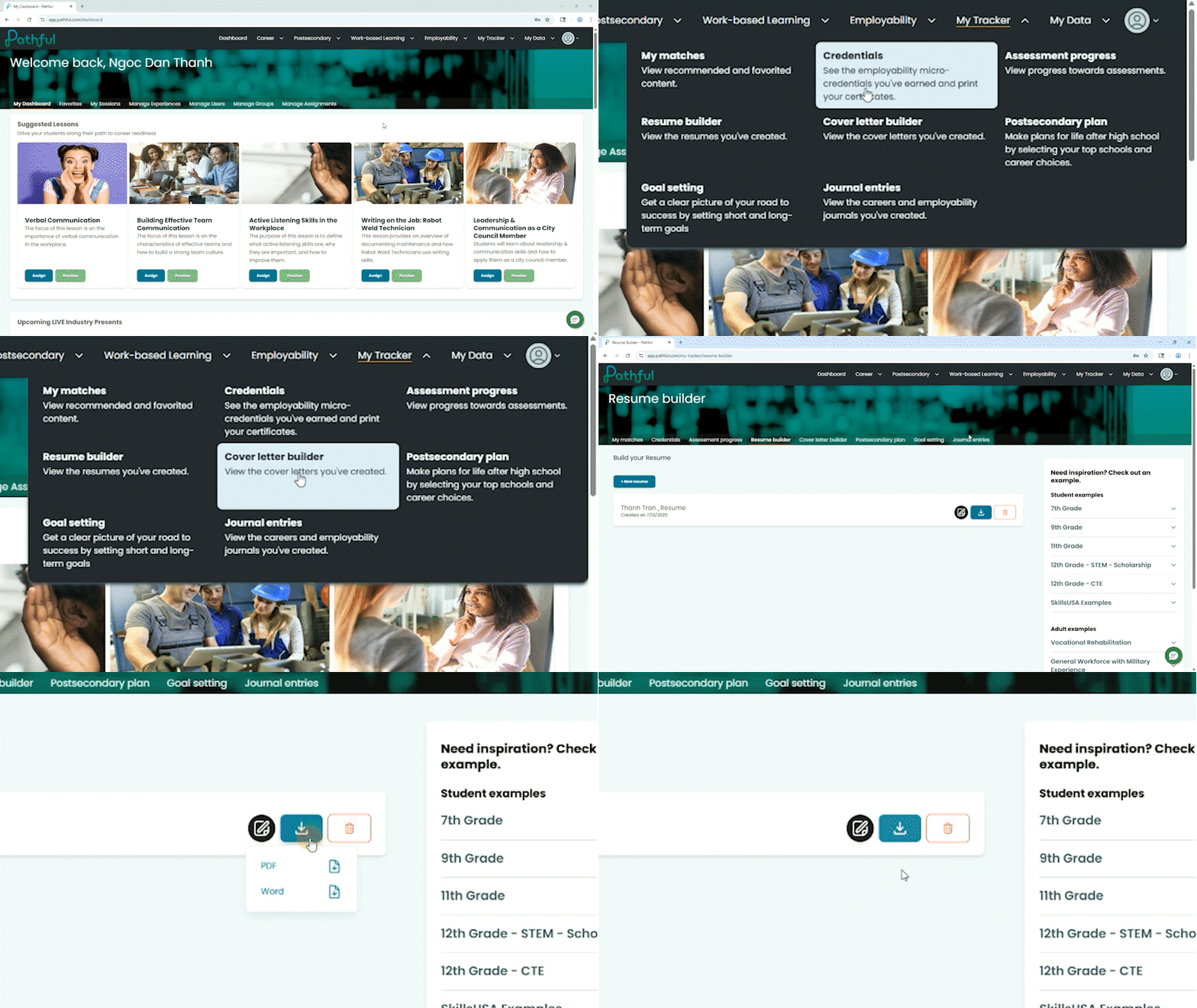
Both builders are located in:
My Tracker > Resume Builder
My Tracker > Cover Letter Builder
Students can create multiple versions, edit at any time, and download completed copies as a Word file or PDF.
Accessibility Support for All Learners
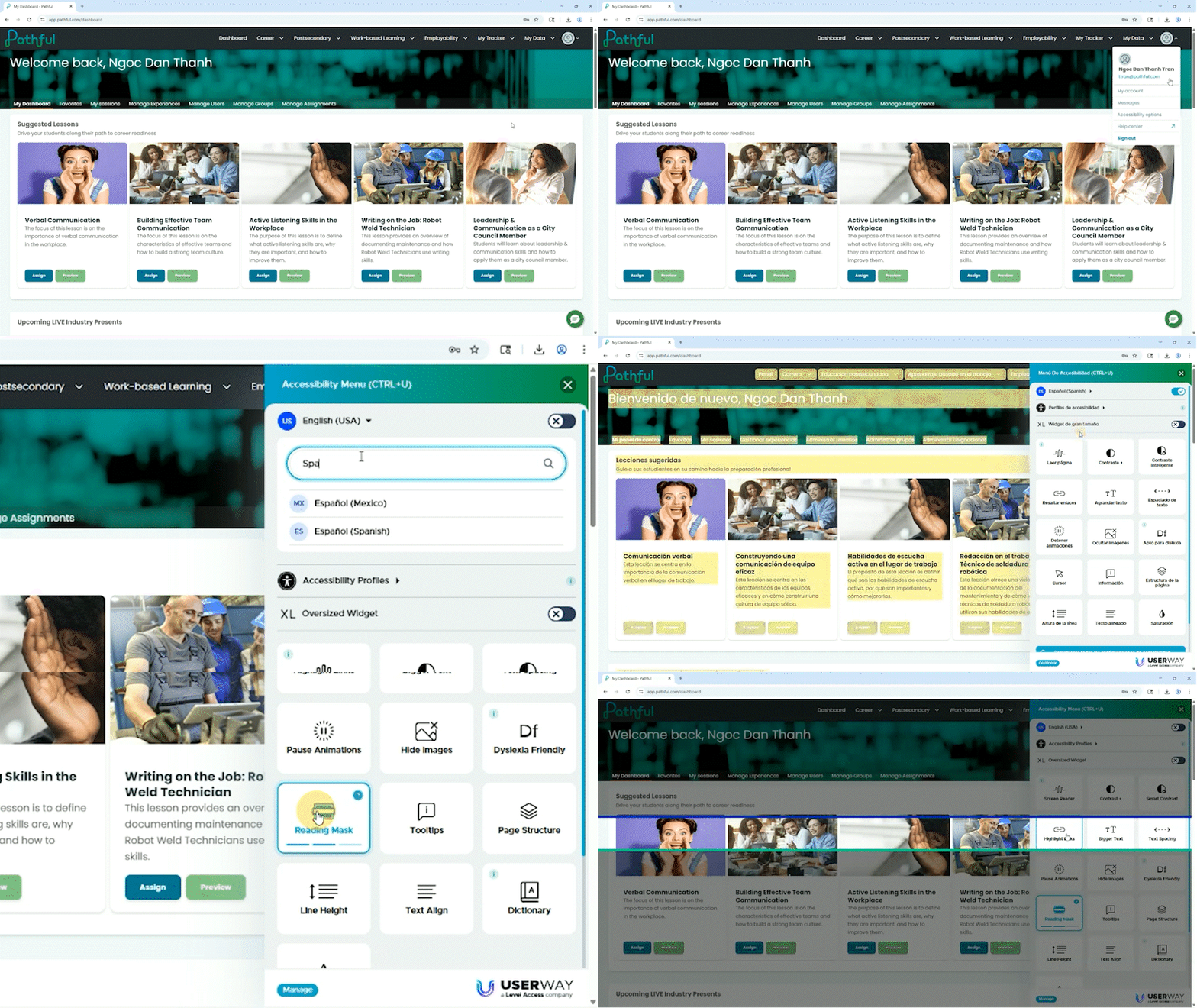
Every student should be able to create a Resume and Cover Letter with confidence. Pathful’s builders include UserWay accessibility tools that improve usability for a wide range of learners. Students can adjust text size, increase contrast, and use text to speech features based on individual needs. Because work saves automatically, students who benefit from breaks or extended time can return to their documents whenever they are ready.
Resume Builder: What Students Can Do
The Resume Builder gives students a guided template with space for all common resume sections. Students fill in the fields and the tool formats their information into a clean, professional layout that is easy to read.
Sections Included
- General Information
- Objective
- Education
- Work Experience
- Achievements
- Volunteer Experience
- Interests and Activities
- Skills
- References
- Other
Students enter their information directly into the text boxes. Students can add multiple entries under Education and Work Experience. All work is saved automatically.
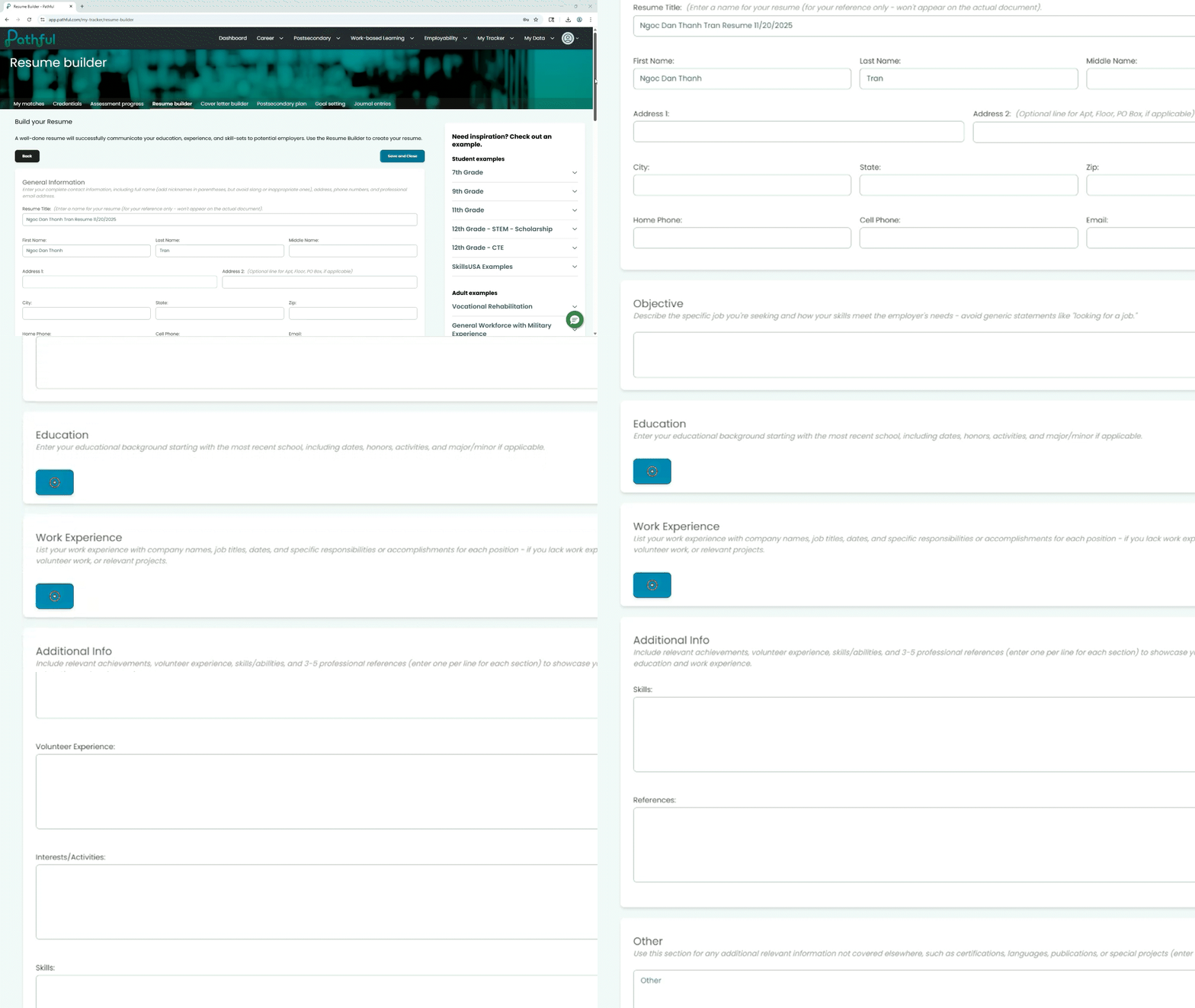
Built In Examples
The sidebar inside the tool contains sample Resumes for:
- Grades 7 to 12
- Adults
- Vocational Rehabilitation
- General Workforce including Military Experience
- Two Year Degree
- College Student for Internships
- College Graduate
These help students understand structure, tone, and what strong entries look like.
Cover Letter Builder: What Students Can Do
The Cover Letter Builder uses the same fill in the blank approach. Students complete a structured letter outline that mirrors a professional format.
Sections Included
- Cover Letter Name
- Recipient Name
- Recipient Position
- Company
- Address, City, State, Zip
- Date
- Salutation
- Introduction
- Body
- Conclusion
- Closing
- Student Name
- Student Contact Information (Address, City, State, Zip, Phone, Email)
Work saves automatically, and students can download their letters as a Word file or PDF. They can also create multiple letters for different opportunities.
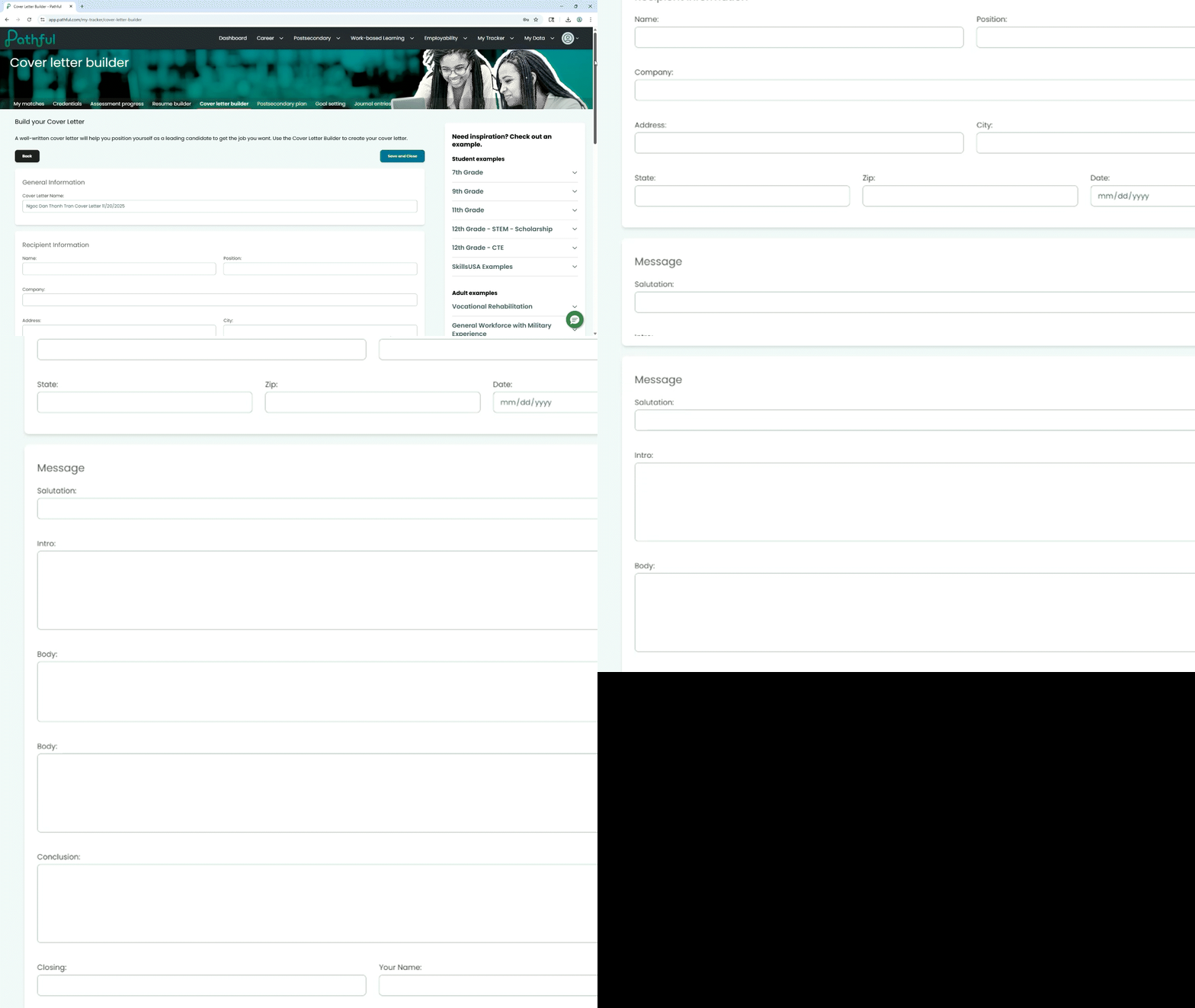
Built In Examples
The sidebar inside the tool contains sample Resumes for the same populations listed above under the Resume Builder Examples.
How Educators Can Use These Tools
Assign Through a FlexLesson
Both tools can be assigned through a FlexLesson. Pathful also offers pre-built FlexLessons for Resumes and Cover Letters, but educators can create their own assignments that guide students directly to the tools.
View Student Work in Reports
Educators can see:
- Saved student Resumes and Cover Letters
- The date each document was created
- The date it was last updated
Educators see metadata first, then click in to view the full document. Downloads are available through the Reports section.
Best Use Cases
- Advisory or homeroom periods: Use the Resume Builder for a quick skills inventory or end of quarter update.
- College and career classes: Introduce both tools during units on goal setting, employability skills, or future planning.
- Work based learning preparation: Have students create documents before job shadows, rotations, or employer visits.
- Internship readiness: Support students as they build versions tailored to specific opportunities.
- Mock interview days: Students can bring printed or digital copies for practice interviews.
- CTE pathways: Align resume sections to industry skills and certifications.
- Early introduction for grades seven and eight: Help younger students identify strengths and early experiences.
Tips for Students Who Have Limited Experience
Many students have not had paid work yet, especially in middle school and early high school. Encourage them to include experiences that show reliability, communication, teamwork, or initiative.
Students can highlight:
- Volunteer work
- School clubs
- Sports and athletics
- Fine arts activities
- Family responsibilities
- Group projects
- Classroom presentations
- Certifications or microcredentials
- Personal achievements
Mini Example for Students With No Work Experience:
School Leadership Project
- Led a small group to build a final presentation
- Organized tasks and ensured each member contributed
- Practiced public speaking skills during the final presentation
This helps students focus on what they learned, not just what they did.
Common Resume Mistakes and How to Make Them Stronger
Mistake: Vague statements like “hard worker.”
How to improve it: Use specific, skill focused examples.
Needs improvement example: Hard worker and good communicator.
Stronger example: Helped organize materials for the school art room and communicated updates to the teacher.
Mistake: Leaving out school activities.
How to improve it: Include clubs, sports, or coursework that show responsibility and teamwork.
Needs improvement example: None.
Stronger example: Member of Robotics Club. Collaborated with team members to troubleshoot designs.
Mistake: Writing long paragraphs.
How to improve it: Use short, clear bullet points to make entries easy to read.
Needs improvement example: I was responsible for helping in the library where I put books away and checked them out...
Stronger example:
• Shelved books by category
• Helped students locate materials
• Checked items in and out using the library system
Mistake: Missing contact information.
How to improve it: Review the General Information section to ensure it is complete and professional.
Needs improvement example: Missing email or using a nickname address.
Stronger example: Use a simple, professional email like first.last@gmail.com.
Mistake: Using first person (“I did...”).
How to improve it: Start bullet points with strong verbs to highlight actions and skills.
Needs improvement example: I helped my teacher organize the lab.
Stronger example: Organized lab materials before and after activities.
Mistake: Listing duties without accomplishments.
How to improve it: Add outcomes or skills that show impact.
Needs improvement example: Cleaned tables after lunch.
Stronger example: Maintained a clean lunch area and worked with peers to reset tables quickly.
Mistake: Adding unrelated or inappropriate details.
How to improve it: Focus on school appropriate, relevant interests.
Needs improvement example: Hobbies: arguing online, pranking friends.
Stronger example: Hobbies: strategy games, digital art, music production.
Quick Classroom Strategies
One Class Period Resume Sprint
Objective: Help students complete a rough draft quickly using the built in examples.
Steps:
- Show students where to find sample resumes.
- Set a goal of two entries in Work Experience or Achievements.
- Save drafts and review formatting together.
Why it works: Students produce a real document even in a short block.
Peer Pair Review
Objective: Strengthen clarity and detail.
Steps:
- Students exchange drafts.
- Each partner identifies one strong bullet point and one place to add detail.
- Students revise.
Why it works: Simple structure keeps feedback manageable.
Mock Interview Preparation
Objective: Connect written documents to speaking skills.
Steps:
- Students complete a Resume and Cover Letter.
- Use entries as prompts for practice questions.
- Students explain experiences in their own words.
Why it works: Helps students articulate what they wrote.
Real World Reflection
Objective: Connect Pathful tools meaningfully.
Steps:
- Have students identify a skill shown in a Virtual Job Shadow Video.
- Ask them to match it to an experience on their Resume.
Why it works: Reinforces that skills come from many places.
Connecting to Career Readiness
Resume and Cover Letter writing helps students practice authentic professional communication. Even early drafts help them reflect, organize information, and present themselves with confidence.
These tools connect naturally to:
- Work based learning experiences
- Interview preparation
- Postsecondary exploration
- CTE programs
- Career fairs or guest speakers
- Postsecondary Plan
- Virtual Job Shadow Videos as inspiration for resume entries
Students begin to understand that their experiences have value, even if they are just starting out.
Final Thoughts for Educators
Pathful’s Resume and Cover Letter tools give students a simple, structured way to start creating the professional documents they will use throughout high school, college, and future careers. With built in examples, automatic saving, accessible design, and educator visibility through Reports, the tools make it easy for students to start strong and continue improving over time.
.webp)
.png)
.png)


.png)




.png)
.png)

.png)

.png)
.png)

.png)
.png)


.png)
.png)


.png)
.png)
.webp)

.png)
.png)

.png)
.png)
%20(1).png)
.png)
.png)

.png)

.png)


.png)
.png)
.png)
.png)


.png)


.png)
.png)




.png)
.png)


.webp)
.webp)
%20(1)%20(1).webp)
.webp)
.webp)